0.1 Real-time computing for a mechatronic system
Consider the problem of precisely controlling the angular speed or position of an inertial load, something ubiquitous in automation, robotics, and many other mechanical engineering fields. The general modern solution to this problem is to design a mechatronic1 system that includes an electromechanical subsystem, a real-time computing subsystem, and a user-interface (UI) subsystem. One such system is the target system of this text, which we call the "T1 target system," illustrated on the right of figure 0.1.
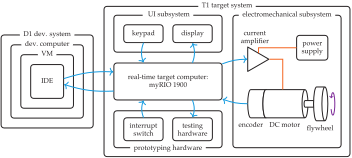
At the heart of the T1 target system is the myRIO 1900 target computer, which includes a real-time operating system (RTOS). Throughout this book, we will immediately apply the real-time computing concepts explored to the programming of this target computer. The T1 target UI and electromechanical subsystems provide an environment that the target computer will control. The UI subsystem consists of a keypad and a display with which a user can interact. Programming the target computer to interface with the keypad and display will be the focus of lab exercises 1 to 3. The electromechanical subsystem includes a DC motor driven by a current amplifier. The current amplifier is controlled by the target computer but receives its power from a separate supply. The motor is connected to an inertial load, a flywheel, the angular position and velocity of which we will incrementally learn to control in lab exercises 4 to 8.
A development system is required to program the target computer, as is illustrated on the left of figure 0.1. The development system is used to program the target computer; once the programming is complete, the development system can be disconnected and the target computer can operate independently. The nested subsystems of the development system include a development computer (a PC), a virtual machine (VM; an emulation of a computer) for portability, and an integrated development environment (IDE) for programming.
The development system is described further in section 0.2. We will first consider the target system in greater detail.
0.1.1 The real-time target computer subsystem
The real-time target computer subsystem controls the electromechanical subsystem. This control will be able to answer questions such as, "How much current should be applied to the motor right now?" The "right now" refers to the real-timeness of the computing. A real-time computer's latency is the duration between the moment of an input change, such as a measurement or a user command, and an output change, such as the current applied to a motor. In control systems, the required latency is related to the speed at which the system under control (known as the "plant") changes. A quickly changing plant requires a real-time computer with smaller latencies than those of a slowly changing plant.
Many mechanical systems of interest respond rather quickly, in milliseconds to seconds. The constraints on the computing system, then, are rather rigorous. Real time waits for no computer. Therefore, timing considerations must be paramount in our consideration of the computing system, and we must treat the computer as integral to the entire system.
How does the computer determine what should be done? Answers to this question fall into three categories:
- User commands
-
The user of the system provides the system with commands about its behavior, such as "spin at \(300\) revolutions per minute (RPM)."
- Programming
-
The engineer programs the computer to interpret the user's commands and instantiate a control algorithm. This control algorithm computes control signals that interact with the electronic system and thereby influence the mechanical system's behavior.
- Feedback
-
In many cases, the state of the mechatronic system is measured with sensors (e.g., encoders), providing the computer with feedback about the system, which the control algorithm uses to compute control signals.
As we explore the other subsystems of the target system, we will encounter the user commands and feedback. For programming, we will have to wait for further discussion of the development system.
0.1.1.1 The target computer
The target computer is the National Instruments (NI) myRIO 1900. This is the computer that controls the target system via the C programs that we will write and the user input.
The myRIO board, pictured in figure 0.2, is designed around a Xilinx Z-7010 system on a chip (SoC), which includes both an ARM Cortex-A9 processor for general programming and a field-programmable gate array (FPGA) for fast input/output (I/O), which we will use for, among other I/O tasks, counting the encoder's rotation.
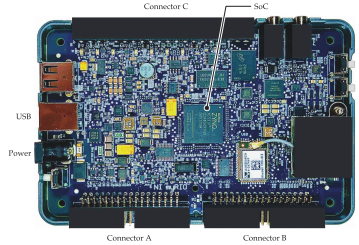
The myRIO runs a version of Real-Time Linux, an RTOS.2 It can run programs in a variety of programming languages, but we will program it in C, which is the language of choice for most real-time programming.3 In each lab exercise, we will write and execute C programs on the myRIO.
The myRIO is described in detail in chapter A. If you are building your own target system, please refer to that appendix.
0.1.2 The user-interface subsystem
The user of a target system may be, for example, a person using a consumer device, a worker in a manufacturing plant tasked with adjusting automation settings, or an engineer programming a robot for complex tasks. The user must be able to input high-level commands that prescribe the behavior of the device. The general term for this interface is user input device. This is often an array of mechanical buttons, a keypad, or a hardware keyboard, as illustrated in figure 0.3. In the T1 target system, we will use a keypad and momentary contact buttons.


In most cases, the user must also be able to receive information from the target computer. Such information can include, for example, menu options, system status, and measured system variables. In most cases, this is some sort of display, although it can be as simple as a light-emitting diode (LED) indicator. Displays can be simple \(n\)-segment displays, dot-matrix liquid crystal displays (LCDs), or LCD/LED screens, as illustrated in figure 0.4.


The T1 target system user interface devices are a keypad and a display. The keypad is a 16-key in a \(4 \times 4\) arrangement, depicting the \(10\) decimal digits and some control characters, as shown in figure 0.5a. The display is a four-row dot-matrix display with 20 characters per row, as shown in figure 0.5b.

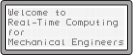
In lab exercises 1 to 3, we will write programs for the myRIO to communicate with these devices. In later lab exercises, we will continue to solicit user input through the keypad and present information on the display.
Chapter A describes the two UI devices in detail.
0.1.3 The electromechanical subsystem
As shown in figure 0.1, the T1 target electromechanical subsystem, under the control of the target computer, supplies power to a motor, which rotates a flywheel (inertial) load. To drive the motor, a variable amount of electrical power will be required. A power supply supplies electrical power to the circuit. In general, this can be alternating current (AC) or direct current (DC), but the T1 target system will require a DC power supply. However, a DC power supply is not adjustable by itself—some fixed voltage or current will be supplied to any electrical load connected, within power limitations.
How can the target computer's control decisions about the voltage or current to be supplied to the motor be carried out? The T1 target amplifier (figure 0.1) plays this role by "reading" the computer's command signals and allowing the commanded amount of voltage or current from the power supply to pass through to the motor.
An amplifier is selected in concert with the power supply and the motor. Common motor types for applications that require position control are brushed DC (BDC) motors, brushless DC (BLDC) motors, and stepper motors. Our T1 target system will have a permanent magnet brushed DC (PMDC) motor, which costs less and requires much simpler electronics than BLDC motors. Stepper motors are also inexpensive and require simple electronics, but they are often inappropriate for continuous and precise motion control and for power-hungry applications.
In chapter 4, motor-driving amplifiers will be considered in detail. For DC motors, they generally fall into two categories:
- Voltage amplifiers, which apply a voltage proportional to a command signal
- Current amplifiers, which apply a current proportional to a command signal
In our T1 target system, we will use a current amplifier.
Figure 0.6 shows a block diagram of the closed-loop target system. The target computer takes user commands and compares them to encoder measurements. In response to the differences between command and measurement, the controller determines the amount of current that the amplifier should apply to the plant, composed of the motor and flywheel. The lab exercises of each chapter will build up to this closed-loop control, which is fully implemented in lab exercises 7 and 8.
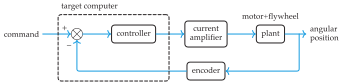
The motion of the mechanical load of the motor is what we want to control. In particular, we will control the angular velocity and position of a flywheel that is driven by the motor. In lab exercise 4, we will begin controlling the velocity with open-loop control and in lab exercise 7 control the velocity with closed-loop control. Feedback of the angular position is provided by an encoder. Lab exercise 8 explores position control of the flywheel.
Chapter A describes the target electromechanical subsystem in detail.
0.1.4 The prototyping and testing hardware
Additional hardware is used for the prototyping process and testing only. It includes several components that are key to developing the system, debugging issues that arise, and testing. Most components are typical laboratory equipment such as an oscilloscope and a few specialized components such as NAND gate integrated circuits (ICs) for mechanical switch debouncing (see lab exercise 5). Of particular note here is the use of mechanical switches for some prototyping tasks, such as the triggering of finite state machine (FSM) transitions (lab exercise 4) and interrupts (lab exercise 5).
Chapter A describes the prototyping and testing hardware in detail.
Throughout this text, terms related to key concepts are typeset in bold where they are first defined or used.↩︎
See section 5.1 for more on RTOSs.↩︎
See section 0.4 for a discussion of why C is the lingua franca of real-time computing.↩︎