Lab exercise 7: Motor velocity control
The objectives of this exercise are:
- To incorporate many of the hardware and software elements developed previously in this book into an integrated closed-loop control system
- To implement a program structure allowing continuous modification of the control parameters without halting the control algorithm
- To implement a proportional-integral (PI) velocity control algorithm for the DC motor
The T1 target system will be required, but only the components listed in chapter B are needed for this lab exercise. Set up each component in accordance with the instructions for your specific T1 version in section A.1. Connect your components in the manner described in the "Online Resources" section of the web page for this lab exercise: .
Introduction
In this exercise, a closed-loop control system for the DC motor will be developed. This system is similar to actuators used in many types of positioning systems. The primary drive of one axis of an automated machine tool or of one axis of motion of an industrial robot is often a computer-controlled DC motor.
Our system will control the motor velocity, as shown in figure 7.24. The control algorithm will repeatedly compare the measured velocity of the motor \(\Omega_J\) with the desired reference velocity \(\Omega_R\), and automatically alter the applied control current to correct any differences. Although this is not a trivial computer control task, we have developed nearly all the required elements in the preceding lab exercises.
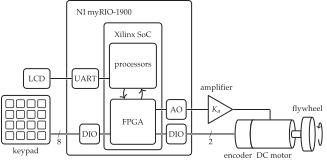
The quadrature encoder (through the field-programmable-gate array (FPGA)), the DAC (connected to the current amplifier), and the periodic timer interrupt will be combined to control the DC motor.
As in lab exercise 6, a separate timer thread will produce an interrupt at the end of each basic time interval (BTI), also called the "sample period." The ISR will load the IRQTIMERWRITE and IRQTIMERSETTIME registers to schedule the next BTI, and then call functions to do the following:
- Read the encoder counter and compute the velocity.
- Execute the motor control algorithm.
- Save the results as necessary.
The control system will be "table-driven." That is, the parameters used by the control algorithm (reference speed, system gains, and BTI length) will be kept in a special table of values. Through the keypad and display user interface (UI), the values of the parameters in the table will be altered (interactively) by a "table editor" function called from the main program thread. The only tasks of the table editor will be to change the table values in response to commands from the keypad and to display performance information.
This table-driven structure will allow the user to change any of the control parameters, at any time, without stopping the execution of the control algorithm. It will appear as though two programs, the table editor and the control algorithm, are executing simultaneously.
You will not write the table editor. The required function, ctable2(), is described in section D.2. It has been included in the T1 C library. Although you will not write this function, it uses the basic keypad/display algorithms that you developed in lab exercises 1 to 3. The prototype for ctable2() is in ctable2.h.
Following the controller design discussion of section 7.6, the control block diagram is shown in figure 7.25. The motor will be controlled using a PI control law, as shown inside the dashed box.
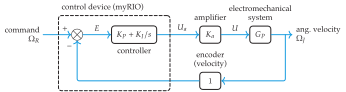
The PI control law relates the error \(e(t)\) to the output control signal \(u_a(t)\) using the gain constants \(K_P\) and \(K_I\).
Applying Tustin's method to the continuous controller transfer function \[ G_C(s)=K_P+\frac{K_I}{s}, \] the corresponding discrete transfer function is \[ G_C(z) = \frac{U_a(z)}{E(z)}=\frac{b_{0}+b_{1}z^{-1}}{a_{0}+a_{1}z^{-1}}, \tag{7.41}\] where \[ \begin{aligned} a_{0}&=1, &b_{0}&=K_P+\frac{1}{2}K_I T, \\ a_{1}&=-1,\text{ and} &b_{1}&=-K_P+\frac{1}{2}K_I T, \end{aligned} \] where \(T\) is the sample time, and the error is \[ E(n)=\Omega_R(n)-\Omega_J(n). \] See section 6.4 on discrete time systems. You will implement the corresponding difference equation using the general-purpose algorithm that you developed in lab exercise 6.
Writing the program
Drawing on your previous work, write two threads to (1) communicate with the user and (2) control the motor.
Main program thread
The main program should perform these tasks:
Initialize the table editor variables.
Set up and enable the timer IRQ interrupt (as in lab exercise 6).
As in lab exercise 6, register the timer thread and create the thread to catch the timer interrupts. In this lab exercise, the timer thread should gain access to the table data through a pointer. Modify the timer thread resource to include a pointer to the table. For example,
typedef struct {
  NiFpga_IrqContext irqContext;  // context
  table *a_table;                // table
  NiFpga_Bool irqThreadRdy;      // ready flag
} ThreadResource;
Therefore, before you create the thread, you must initialize the thread resource to point to your table, and set the Thread Ready flag:
     irqThread0.a_table = my_table;
     irqThread0.irqThreadRdy = NiFpga_True;
Call the table editor. The table should contain six values, labeled as shown:
V_R: rpm     {edit}
V_J: rpm     {show}
VDAout: mV   {show}
Kp: V-s/r    {edit}
Ki: V/r      {edit}
BTI: ms      {edit}
All the table edit values should be initialized to zero except for the BTI length, which should be \(5\) ms. Note the units. After the main program calls the table editor, the user may edit and view the table values as desired.
When the table editor exits, signal the timer thread to terminate. Wait for it to do so.
Timer thread ISR
At the beginning of the starting function, declare convenient names for the table entries from the table pointer as follows:
double *Omega_R = &((threadResource->a_table + 0)->value);
double *Omega_J = &((threadResource->a_table + 1)->value);
// etc.
As in lab exercise 6, the timer thread should include a main loop timed by the IRQ, and terminate only via its ready flag. Before the loop begins do the following:
- Initialize the analog input/output (I/O) and set the motor voltage to zero, using
Aio_Write()(as in lab exercise 6). - Set up the encoder counter interface (as in lab exercise 4).
Each time through the loop, it should do the following:
- Get ready for the next interrupt by waiting for the IRQ to assert, writing the Timer Write Register, and writing
TRUEto the Timer Set Time Register. - Call
vel(), from lab exercise 4, to measure the velocity of the motor. - Compute the current coefficients (\(a_i\) and \(b_i\)) for the PI control law from the current values of \(K_P\) and \(K_I\). See equation (7.41). Update the values of the
biquadstructure. - Compute the current error \(\Omega_R-\Omega_J\).
- Call
cascade()to compute the control value from the current error using the difference equation for the PI control law. Important: Limit the computed control value to the range \([-10.0,+10.0]\) V. - Send the control value (in V) to the DAC on connector C, channel
AOC0(see figure 3.10b), withAio_Write(). - Change the show values in the table to reflect the current conditions of the controller.
- Save the results of this BTI for later analysis. (This is discussed in more detail next.)
- Acknowledge the interrupt.
Functions
Two additional functions are needed. Both functions were developed in previous lab exercises.
cascade()-
The
cascade()function, called once from the ISR during each BTI, implements the general-purpose linear difference equation algorithm from lab exercise 6. For this lab, use the same C code that you used in lab exercise 6. In this case, there will be 1 biquad section. Note that, as in lab exercise 6, all calculations should be made in (double) floating-point arithmetic. vel()-
Use the
vel()function, developed in lab exercise 4, to read the encoder counter and estimate the angular velocity in units of basic displacement increment/basic time interval (BDI/BTI).
Saving the Responses
A convenient method of saving the data is to define data arrays in the ISR for both the angular velocity measurement \(\Omega_J\) and \(u_a\), the DAC output voltage (amplifier input). Then, an autoincremented index variable is used to store the data in the arrays during each BTI. Increment the index as needed, stopping when index reaches the length of the arrays. A convenient length would be \(250\) points each.
Because the program runs continuously, you may wish to save the response (see section D.1) whenever the reference velocity is changed. This is easily accomplished by checking to see if the reference velocity has changed since the last BTI and resetting the index to zero if it has. Since the index is then less than the length of the arrays, the arrays will be refilled. This is equivalent to recording the response to a step input in the reference velocity.
In addition, when the ISR resets the index to zero, save the previous value of the reference velocity. That value, along with other system parameters, will be used for postprocessing the data to predict the theoretical model response.
After the main loop terminates, but while still in the timer thread, write the results to the Lab7.mat file. The results should include the following:
- Your name (string)
- The measured velocity \(\Omega_J\) array (rad/s),1
- The output voltage \(u_a\) array (V)
- The current and the last previous reference velocities (rad/s)
- \(K_P\) (V\(\cdot\)s/rad)
- \(K_I\) (V/rad)
- BTI length (s)
Use the same methods as in lab exercise 4 and lab exercise 6 to bring the Lab7.mat file to MATLAB.
Emulation
As an aid in debugging, our T1 C library includes a software "emulation" (a dynamic model) of the analog output, the amplifier, the motor, and the encoder. The emulator allows you to run your code and save the MATLAB file without being connected to the amplifier and motor.
To activate the emulator, #include the header file emulate.h. When you want to execute your code on the myRIO using the hardware interfaces, comment out the included emulator header and rebuild the project.
Laboratory exploration and evaluation
In the following, let the base set of controller parameters be a sample time or BTI of \(T = 5\) ms and the controller gains \(K_P\) and \(K_I\) from equation (7.39), repeated here: \[ \begin{aligned} K_P &= -\frac{B + 2 J \Re(\psi)}{K_a K_M}\text{ and} \\ K_I &= \frac{Z \left(B + 2 J \Re(\psi)\right)}{K_a K_M}. \end{aligned} \] The T1a target system parameters can be found in appendix: DC Motor Control Model2 and the design point \(\Re(\psi)=-20\) rad/s, which corresponds to \(T_S\approx 0.2\) s, and \(Z = -20\) rad/s. See appendix: DC Motor Control Model for a control systems model and associated transfer functions.
From equation (7.39), compute the base set of gains \(K_P\) and \(K_I\) for the rest of these laboratory problems. For the T1a specific target system, confirm that they are \(K_P = 0.104\) V\(\cdot\)s/rad and \(K_I = 2.07\) V/rad.
Design a PI controller for your specific T1 target system following the root locus design technique of sections 7.6.2 to 7.6.6. Compare the gains \(K_P\) and \(K_I\) to the base set of gains computed in lab problem L7.1.
Write, test, and debug the program described in writing the program. For debugging purposes, use the base set of parameters.
Measure the steady state speed of the motor with an optical tachometer. Compare this value to the reference speed that you specified in the table. How close is it?
While the motor is at steady state speed, gently apply a steady manual load torque to the motor shaft. What are the responses that you observe on the display of the measured velocity V_J and control voltage VDAout? Explain.
Beginning with the base set of parameters, explore the effect of varying the proportional gain \(K_P\) on the transient response. Try smaller and larger values of \(K_P\). What are the effects on the oscillation frequency and the damping? Explain this in terms of the closed-loop transfer function parameters described in section 7.5.2.
Beginning with the base set of parameters, explore the effect of varying the integral gain \(K_I\) on the transient responses. Try smaller and larger values of \(K_I\). What are the effects on the oscillation frequency and the damping? Explain this in terms of the closed-loop transfer function parameters described in section 7.5.2.
Using the base set of parameters, record the control output voltage \(U_a\) and measured velocity responses for a step change in the reference velocity that starts from \(-200\) RPM and goes to \(+200\) RPM. In MATLAB, compare these experimental responses with the analytical responses for the continuous system approximation. See lab exercise 7 Appendix for a summary of the closed-loop model.
The theoretical responses can be calculated using the appropriately scaled MATLAB step() command. The analysis should be plotted over the experimental responses. Use the subplot() command to place both the control value and the measured velocity plots on the same page. What do you conclude?
Appendix: DC Motor Control Model
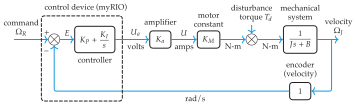
The model shown in figure 7.26 is a continuous approximation of the discrete control of the DC motor implemented in this lab exercise. Three assumptions are made:
- The sampling frequency is much larger than the system natural frequency.
- Time delays caused by computation are insignificant.
- The control value does not saturate. Parameters are shown in table 7.2.
| Symbol | Description | Value |
|---|---|---|
| \(K_a\) | Amplifier gain | \(0.06\) A/V |
| \(K_M\) | Motor torque constant | \(0.0698\) N\(\cdot\)m/A |
| \(J\) | Load inertia | \(1.1\times10^{-5}\) N\(\cdot\)m\(\cdot\)s\(^2\)/rad |
| \(B\) | Damping coefficient | \(0\) N\(\cdot\)m\(\cdot\)s/rad |
| \(K_P\) | Proportional gain | \(0.104\) V\(\cdot\)s/rad |
| \(K_I\) | Integral gain | \(2.07\) V/rad |
Typically, the effect of the mechanical damping \(B\) is small compared to the effect of the proportional term in the controller. Also, during transient response, the damping torque is small compared to the inertial torque. Therefore, for design purposes, we assume that \(B = 0\) N\(\cdot\)m\(\cdot\)s/rad.
The following three transfer functions are obtained from the block diagram:
- The transfer function relating the reference input \(\Omega_R(s)\) to the output angular velocity of the load \(\Omega_J(s)\) is \[ \frac{\Omega_J(s)}{\Omega_R(s)}=\frac{(\tau s+1) {\omega_n}^2}{s^2+2\zeta \omega_n s+{\omega_n}^2}. \tag{7.42}\]
- The transfer function relating the disturbance torque input \(T_d(s)\) to the output angular velocity of the load \(\Omega_J(s)\) is \[ \frac{\Omega_J(s)}{T_{d}(s)}=\frac{s K_d {\omega_n}^2}{s^2+2\zeta \omega_n s+{\omega_n}^2}. \tag{7.43}\]
- The transfer function relating the reference input \(\Omega_R(s)\) to the DAC output voltage \(U_a(s)\) is \[ \frac{U_a(s)}{\Omega_R(s)}=\frac{s (\tau s+1) K_u {\omega_n}^2}{s^2+2\zeta \omega_n s+{\omega_n}^2}. \tag{7.44}\]
Let \(K=K_a K_M\). Then the natural frequency and damping ratio are \[ \omega_n=\sqrt{\frac{K_I K}{J}} \quad\text{and}\quad \zeta=\frac{K_P}{2}\sqrt{\frac{K}{J K_I}} \] where \[ \tau=\frac{K_P}{K_I},\quad K_d=\frac{1}{K_I K},\text{ and}\quad K_u=\frac{J}{K}. \]
When converting the rotational velocity to rad/s, the value of \(\pi\) is needed. The math.h header file includes a macro,
M_PI, that equals \(\pi\).↩︎Values for other specific target systems can be found in section A.1.↩︎
Values for other specific target systems can be found in section A.1.↩︎