Lab exercise 3: Programming the low-level user interface
The objectives of this lab exercise are:
- To write the final, low-level user interface (UI) functions (device drivers) for the T1 target system
- To learn more about how the keypad and LCD can communicate with the myRIO
- To apply the digital communication techniques introduced in this chapter, and in particular to program the myRIO's UART and DIO interfaces
The T1 target system will be required, but only the components listed in chapter B are needed for this lab exercise. Set up each component in accordance with the instructions for your specific T1 version in section A.1. Connect your components in the manner described in the "Online Resources" section of the web page for this lab exercise: .
Introduction
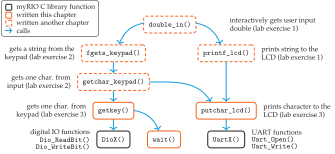
In this lab exercise, we will write the lowest-level routines for the UI with the keypad and LCD: the putchar_lcd() and the getkey() functions, which reside in the call graph of UI functions as shown in figure 3.13. In the preceding lab exercises, we used versions of these drawn from the T1 C library. These lowest-level functions directly interact with the UART and DIO communication hardware of the myRIO.
Part I: Character output: writing putchar_lcd()
The function putchar_lcd() puts a single character on the LCD. The character may be any in the ASCII code or any of the escape sequences ('\f', '\v', '\n', '\b') described in background: special characters for the display and section 3.9. The prototype of the putchar_lcd() function is
int putchar_lcd(int c);
where the argument c is the character to be sent to the display. If it is in the range \([0, 255]\), then the returned value should equal the input value. If the input value is outside that range, then an error should be indicated by returning EOF.
The version of putchar_lcd() that we will now write will replace the one that we have been using from the T1 C library. Calls to putchar_lcd() might be
ch = putchar_lcd('m');                // ch == 'm'
putchar_lcd('\n');                    // new line directive
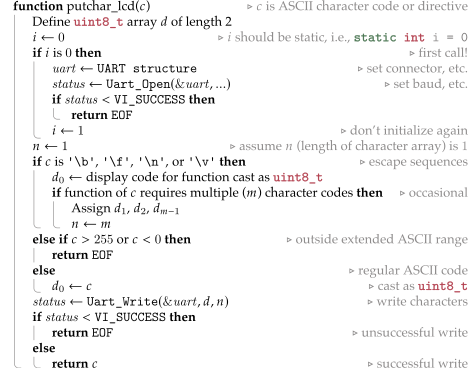
Serial data are sent to the LCD through a UART. The putchar_lcd() should perform four tasks:
- Initialize the B connector's UART port, but only the first time that
putchar_lcd()is called. - If the input character is in the range \([0, 255]\)), send it to the display or send a decimal code to the display as an escape sequence directive.
- Check for the success of the UART write.
- If the write is successful, return the character to the calling program. Otherwise, return
EOF.
Background
The UART must be initialized once before any data are passed to the display. It is initialized through the Uart_Open() function that sets appropriate myRIO control registers to define the operation of the UART. To communicate properly with our LCD, the UART must be initialized as follows:
uart.name = "ASRL2::INSTR";           // UART on connector B
uart.defaultRM = 0;                   // def. resource manager
uart.session = 0;                     // session reference
status = Uart_Open(&uart,             // port information
                   baud_rate,         // baud rate bps
                   8,                 // no. of data bits
                   Uart_StopBits1_0,  // 1 stop bit
                   Uart_ParityNone);  // no parity
where uart (type: static MyRio_Uart) is a port information structure, baud_rate is the baud rate for the specific T1 target display (19,200 baud for the T1a target system display),1 and status (type: NiFpga_Status) is the returned value. The macros Uart_StopBits1_0 and Uart_ParityNone are defined in UART.h. You must #include UART.h in your code.
Perform this UART initialization just once, and immediately return EOF from putchar_lcd() if status is less than the VI_SUCCESS macro.
Escape sequences, received as the argument of putchar_lcd(), control the cursor position and the function of the LCD. They are implemented by sending specialized codes according to the function described in table 3.2. These codes are specific to the T1a target system. For other target systems, look up the codes in section A.1.
| C Escape Sequence | Display Driver Function | Decimal Codes |
|---|---|---|
'\b' |
Move cursor left one space | 8 |
'\f' |
Clear display and move cursor to the start of the first line | 17, 12 |
'\n' |
Move cursor to the start of the next line | 13 |
'\v' |
Move cursor to the start of the first line | 128 |
Arguments of putchar_lcd(), in the range of 0 to 127, are sent to the display, where they are interpreted as the corresponding ASCII characters. Other arguments, in the range 128 to 255, are used for special control functions of the specific display.
Both ASCII characters and decimal codes corresponding to escape sequences are sent to the display using the Uart_Write() function. A typical call would be
status = Uart_Write(&uart,           // port information
                    writeS,          // data array
                    nData);          // no. of data codes
where uart is the port information structure defined during the initialization, writeS (type: uint8_t) is an array containing the data to be written, and nData (type: size_t) indicates the number of elements in writeS.
Again, return EOF if status is less than the VI_SUCCESS. Under normal operation (no errors), return the input character to the calling program.
See algorithm 3.1 for putchar_lcd() pseudocode.
putchar_lcd() pseudocodePart II: Keypad input: writing getkey()
We will now write the getkey() function for getting characters from the keypad. The function should wait for a key to be depressed on the keypad and then return the character code corresponding to that key. The prototype of the getkey() function is
char getkey(void);The version of getkey() that we will now write will replace the one that we have been using from the T1 C library. A call to getkey() might be
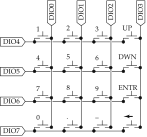
key = getkey();The keypad is a matrix of switches. When pressed, each switch uniquely connects a row conductor to a column conductor. The row and column conductors are connected to eight digital I/O channels of connector B (DIO0–DIO7) of the myRIO, as shown in figure 3.14.
Each DIO channel may be programmed to operate as either a digital input or a digital output. As an output, the channel operates with low output impedance as it asserts either a high or a low voltage at its terminal. When programmed as an input, the channel has high input impedance ("high-\(Z\) mode") as it detects either a high or a low voltage.
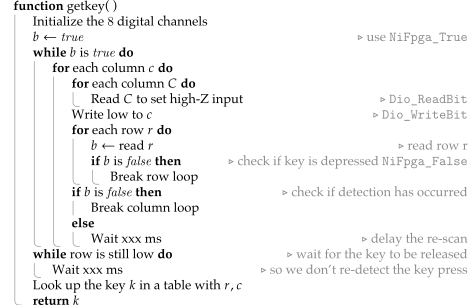
How will we detect if a key is depressed? Briefly, this is accomplished by driving one column to low voltage (false), with the other columns' channels in high-\(Z\) mode. Then, all the rows are scanned (detected). If a row is found to be low, the key connecting that row to the driven column must be depressed. This procedure is repeated for each column. The process is repeated until a depressed key is found.
Essential to this scheme is that a 40-k\(\Omega\) pullup resistor is connected between each channel and the high voltage. So, unless a row is connected (through a key) to a low-impedance, low-voltage column, it will always read as high.
Algorithm 3.2 illustrates one strategy for getkey().
getkey() pseudocodeBackground
Now that we have an overall strategy for getkey(), let's consider a few implementation details.
DIO channel initialization
The MyRio_Dio structure type identifies the control registers and the bit in the register to read or write for a channel. The type is defined in DIO.h as
typedef struct {
  uint32_t dir;  // direction register
  uint32_t out;  // output value register
  uint32_t in;   // input value register
  uint8_t bit;   // bit in the register to modify
} MyRio_Dio;
Declare an array of MyRio_Dio structures, with one element for each of the eight necessary channels. In a loop, initialize the channels as follows:
MyRio_Dio ch[8];                // an array of channels
for (i = 0; i < 8; i++) {       // in the DIOB_70 register bank
  ch[i].dir = DIOB_70DIR;       // line direction (output/input) bit
  ch[i].out = DIOB_70OUT;       // output bit
  ch[i].in = DIOB_70IN;         // input bit
  ch[i].bit = i;                // bit index
}
Now ch[0]–ch[7] correspond to connector B's DIO0–DIO7 lines. As shown in figure 3.14, the columns \(0\)–\(3\) are connected to channels \(0\)–\(3\). The rows \(0\)–\(3\) are connected to channels \(4\)–\(7\). Therefore, the channel index associated with row number \(i\) is \(i+4\).
Reading from and writing to the DIO channels
As described in section 3.10, the functions for reading from and writing to the DIO channels are shown next.
Input: digital channel read function prototype:
NiFpga_Bool Dio_ReadBit(MyRio_Dio *channel);For example, a typical call might be
bit = Dio_ReadBit(&ch[row + 4]);In addition to reading the bit,
Dio_ReadBit()sets the channel to high-\(Z\) mode.Output: digital channel write function prototype:
void Dio_WriteBit(MyRio_Dio *channel, NiFpga_Bool value);For example, a typical call might be
Dio_WriteBit(&ch[col], NiFpga_False);The data type
NiFpga_Boolmay take values of eitherNiFpga_True(high) orNiFpga_False(low).
Key code lookup table
The key code returned by getkey() can be determined by using the row and column values of the key as the indices of a key code table. This table can be stored in a constant two-dimensional 4 \(\times\) 4 array of characters:
const char table[4][4] = {
  {'1', '2', '3', UP},
  {'4', '5', '6', DN},
  {'7', '8', '9', ENT},
  {'0', '.', '-', DEL}
};
To look up a detected column \(c\) and row \(r\), table[r][c] corresponds to the key's character code to be returned. For example, if the detected row was 1 and the column was 2, then the value of table[r][c] is the character '6'.
The symbols UP, DN, ENT, DEL are defined in T1.h.
A simple wait function
The \(xxx\)-ms time delay that occurs twice in algorithm 3.2 will be implemented by calling a function that executes in a fixed amount of time. A simple way to create such a function is to enter a loop that executes many times. Using the wait() function shown here is suggested, as it executes in a fraction of a second. In lab exercise 4, we will accurately predict and measure the actual execution time of this function:
/*  Function wait
    waits for xxx  milliseconds
 */
void wait(void) {
  uint32_t i;
  i = 417000;
  while (i > 0) {
    i--;
  }
  return;
}
Laboratory exploration and evaluation
Write a main() function that will test putchar_lcd() and getkey(). A good strategy is to write main() first, drawing the functions from the T1 C library. Once you have debugged main(), you can test your versions of putchar_lcd() and getkey() by adding them to main.c.
The main() function should do the following:
- Make at least one individual call to each of
putchar_lcd()andgetkey(). Be sure to testputchar_lcd()with a character above decimal255to trigger the error. - Collect an entire string using
fgets_keypad(), which callsgetkey(). - Write an entire string using
printf_lcd(), which callsputchar_lcd(). Be sure to test the escape sequences'\b','\f','\n', and'\v'.
Write, test, and debug putchar_lcd() in the same file as main(). This will replace the putchar_lcd() from the T1 C library.
Write, test, and debug getkey() in the same file as main(). This will replace the getkey() from the T1 C library.
For other target system displays, configuration values can be found in section A.1.↩︎