0.2 The development system
We now turn to the general D1 development system for programming the real-time target computer, illustrated in figure 0.7.
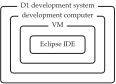
Most PCs running a major operating system can serve as a development computer. The primary requirement is that it can run the hypervisor required by the specific D1 development system version you would like to install. A hypervisor allows a guest operating system to run under the host operating system of your PC. The guest operating system appears to run as an application on the host operating system. The guest operating system is part of a virtual machine (VM), an emulation of an entire computer. A hypervisor manages VMs, which can have various operating systems and software installed.
It is common to use a VM in a development environment. The primary advantage to this technique is that a VM can be entirely defined in software. This allows, among other things, a team of software developers to work on their own PCs in an identical software environment.
Developing C programs for a real-time target computer—as we will do in this book—is much easier with an integrated development environment (IDE), which is an application integrating a text editor for editing source code, building and compiling tools to translate the source code into executable files that can be run on the target computer, and a debugger for tracing the execution of the program through its source code.
Each specific D1 development system (e.g., D1a) includes a VM that is distributed via the book's companion website. See section A.2 for a list of specific D1 development systems, all of which include the IDE software Eclipse. It will be in this IDE that you will write programs for the target computer. In lab exercise 0, we will familiarize ourselves with the Eclipse IDE, including the debugger.
Set up your own development system by following the setup instructions in section A.2.