1.11 Introducing the UI functions of the T1 library
The UI of the T1 target system has two key components: a keypad and an LCD. The provided T1 C library includes functions for interacting with these devices, and in lab exercises 1 to 3 we will be learning to write these drivers together.
In general, we will use the keypad to allow the user to enter floating-point numbers, which will represent quantities like a commanded velocity of the motor, controller gains, and other user-specifiable parameters. The display presents the user with prompts, messages, and a user-editable buffer for the floating-point number that the user is entering. In this last scenario, we see that the keypad and display must be tightly coupled to perform certain tasks.
The UI functions introduced in lab exercise 1 have the call graph shown in figure 1.12. A call graph shows functions as nodes on a graph. The directed edges (lines) that connect the nodes indicate that one function calls the other. Reading figure 1.12, we can say that double_in() calls fgets_keypad() and printf_lcd(). In lab exercise 1, we will write double_in() and printf_lcd(), which call the other two functions. These other functions, fgets_keypad() and putchar_lcd(), will be written in lab exercises 2 and 3. For now, however, the T1 C library provides them.
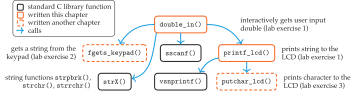
We are already somewhat familiar with the top-level function double_in(), which was used in lab exercise 0 in chapter 0. Recall that double_in() seems like a pretty straightforward function that prompts a user (on the target display) for a number and returns that number as a double. However, there are many details that will be introduced here and explored further in the coming chapters.
The top-level double_in() depends directly on two other T1 library functions: fgets_keypad(), which gets a string from the user's entry on the keypad, and printf_lcd(), which prints a string on the LCD for user prompts. As their names suggest, they are modeled after the standard library fgets() Kernighan and Ritchie (1988) and printf(). The printf_lcd() function also plays a role in presenting messages to the user from the control routines.
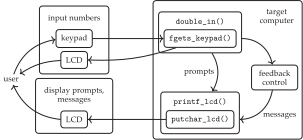
An operational diagram for the UI is shown in figure 1.13; this is a detailed view of the UI portion of figure 1.11. The double_in() function, through fgets_keypad(), provides the user with editable, interactive number entry functionality. Moreover, double_in() sends a user prompts via printf_lcd(). The function printf_lcd() prints both prompts from double_in() and messages from feedback control, which will be implemented in chapters 4 to 8.
References
- Kernighan, B. W. and Ritchie, D.. C Programming Language. Pearson Education. 1988.