Problems
There are many potential applications for real-time computing. Come up with five applications of real-time computing. What dynamic system is each application interacting with?
As this is an open ended question, below is a non-exhaustive list of possible answers.
Cruise Control in a modern vehicle,
temperature control in an oven,
an elevator control system, or
an espresso machine.
For one of your applications of real-time computing in problem 1.1, list several deadlines and whether they are hard, firm, or soft deadlines. Explain why.
The answers to this question depend on the open ended problem 1.1, so it is impossible to list all possible correct answers. Several examples are shown below.
Cruise Control
A cruise control system consists of two main tasks. These are to update the throttle position depending on the current velocity of the vehicle, and to update the desired speed of the vehicle based upon user input. Updating the throttle position must be a hard deadline as not completing the task could cause the vehicle speed to increase or decrease uncontrollably. Modifying the desired speed should have a firm deadline. This is because a soft deadline could cause the vehicle speed to increase or decrease some time after the corresponding button has been pressed. This could lead to confusion and dangerous conditions.
Elevator Control System
In an elevator control system there are two main tasks, moving the elevator, and responding to button pushes requesting the elevator to travel to a specific floor. The deadline for requesting a floor can be soft as the motion of the elevator can be delayed for a reasonable length of time after the button is pressed. However, the task controlling the motion of the elevator must have a firm deadline as any delays in completing the task could cause the elevator to overrun the floor it is attempting to reach.
Initialize a double array with values 1.0, 2.0, and 3.0. Loop through the array and print each floating-point number without using array indices.
  #include <stdio.h>

  void main(void) {
    double array[] = {1.0, 2.0, 3.0};
    double *array_ptr = array;
    int i;
    for(i=0; i<3; i++) {
      printf("%f\n", *array_ptr++);
    }
}| Address | Contents |
|---|---|
0x2C68 |
0101 1011 |
0x2C69 |
1001 1000 |
0x2C6A |
0001 0001 |
0x2C6B |
1111 0110 |
Assuming that the memory contents in table 1.8 are unsigned binary integers, convert the contents to hexadecimal.
To convert the binary memory contents to hexadecimal we will split the bytes into nibbles, convert each nibble to decimal, and finally convert the decimal nibbles to two hexadecimal digits.
The first byte in memory is
0101 1011. This can be split into two nibbles,0101and1011. The first nibble can be converted to decimal, \[0101_2=1\times2^2+1\times2^0=5_{10},\] as well as the second, \[1011_2=1\times2^3+1\times2^1+1\times2^0=11_{10}.\] Since, \(5_{10}=5_{16}\) and \(11_{10}=B_{16}\), the memory contents \(0101\ 1011_2=5B_{16}\).The next byte in memory is composed of two nibbles,
1001and1000. Converting these to decimal and hexadecimal, \[1001_2=1\times2^3+1\times2^0=9_{10}=9_{16},\] and \[1000_2=1\times2^3=8_{10}=8_{16}.\] Therefore, in hexadecimal the memory contents is98.The third byte in memory is composed of two nibbles,
0001and0001. Converting these to decimal and hexadecimal, \[0001_2=1\times2^0=1_{10}=1_{16}.\] Therefore, in hexadecimal the memory contents is11.The final byte in memory is composed of two nibbles,
1111and0110. Converting these to decimal and hexadecimal, \[1111_2=1\times2^3+1\times2^2+1\times2^1+1\times2^0=15_{10}=F_{16},\] and \[0110_2=1\times2^2+1\times2^1=6_{10}=6_{16}.\] Therefore, in hexadecimal the memory contents isF6.
Assuming that the memory contents in table 1.8 are unsigned binary integers, convert the contents to decimal.
The byte of memory at
0x2C68can be converted to decimal using, \[01011011_2=0\times2^7+1\times2^6+0\times2^5+1\times2^4+1\times2^3+0\times2^2+1\times2^1+1\times2^0=91_{10}.\]The byte of memory at
0x2C69can be converted to decimal using, \[10011000_2=1\times2^7+1\times2^4+1\times2^3=152_{10}.\]The byte of memory at
0x2C6Acan be converted to decimal using, \[00010001_2=1\times2^4+1\times2^0=17_{10}.\]The byte of memory at
0x2C6Bcan be converted to decimal using, \[11110110_2=1\times2^7+1\times2^6+1\times2^5+1\times2^4+1\times2^2+1\times2^1=246_{10}.\]
As a check on your calculations, convert the hexadecimal numbers from problem 1.4 to decimal.
From problem 1.4 the first byte of memory in hexadecimal is
5B. This can be converted to decimal as follows, \[5B_{16}=5\times16^1+11\times16^0=91_{10}.\]The next byte of memory in hexadecimal is
98. This can be converted to decimal as follows, \[98_{16}=9\times16^1+8\times16^0=152_{10}.\]The following byte of memory in hexadecimal is
11. This can be converted to decimal as follows, \[11_{16}=1\times16^1+1\times16^0=17_{10}.\]The final byte of memory in hexadecimal is
F6. This can be converted to decimal as follows, \[F6_{16}=15\times16^1+6\times16^0=246_{10}.\]
As a check on your calculations, convert the decimal numbers from problem 1.5 to hexadecimal.
From problem 1.5 the first byte of memory in decimal is
91. This can be converted to hexadecimal by successively dividing by 16. \(91_{10}\) divided by \(16_{10}\) is \(5_{10}\) with a remainder of \(11_{10}=B_{16}\). Then, dividing \(5_{10}\) by \(16_{10}\) results in \(0\) with a remainder of \(5_{10}=5_{16}\). Arranging the remainders from right to left gives the hexadecimal number5B.The next byte in decimal is
152. To convert this to hexadecimal, divide \(152_{10}\) by \(16_{10}\) resulting in \(9_{10}\) with a remainder of \(8_{10}\). It can easily be seen that the remainder of \(9_{10}\) divided by \(16_{10}\) is \(9_{10}\). Therefore, \(152_{10}=98_{16}\).The following byte in decimal is
17. To convert this to hexadecimal, divide \(17_{10}\) by \(16_{10}\) resulting in \(1_{10}\) with a remainder of \(1_{10}\). Since the remainder of \(1/16\) is \(1_{10}\), \(17_{10}=11_{16}\).The final byte in decimal is
246. To convert this to hexadecimal, divide \(246_{10}\) by \(16_{10}\) resulting in \(15_{10}\) with a remainder of \(6_{10}\). Since the remainder of \(6/16\) is \(6_{10}\), \(246_{10}=6F_{16}\).
Add the memory contents at addresses 0x2C68 and 0x2C69 in table 1.8. Assuming that the sum is an unsigned binary integer, convert the sum to decimal and compare to the sum of the decimal numbers obtained in problem 1.5.
\[\begin{aligned} \begin{array}{B2} & \texttt{\ \ 11} \\ & \texttt{0101}\, \texttt{1011} \\ {} + & \texttt{1001}\, \texttt{1000} \\ \hline & \texttt{1111}\, \texttt{0011} \\ \end{array} \end{aligned}\] Converted to decimal this some is, \[11110011_2=1\times2^7+1\times2^6+1\times2^5+1\times2^4+1\times2^1+1\times2^0=243_{10}.\] Since \(91_{10}+152_{10}=243_{10}\), the binary addition is correct.
Add the memory contents at addresses 0x2C6A and 0x2C6B in table 1.8. Remember, there are only 8 bits of memory. Assuming that the sum is an unsigned binary integer, convert the sum to decimal and compare to the sum of the decimal numbers obtained in problem 1.5. Explain any issues. What would happen if there were 9 bits of memory?
\[\begin{aligned}
\begin{array}{B2}
& \texttt{111} \\
& \texttt{0001}\, \texttt{0001} \\
{} + & \texttt{1111}\, \texttt{0110} \\ \hline
& \texttt{0000}\, \texttt{0111} \\
\end{array}
\end{aligned}\] Where the last carry is not performed, because there are only 8-bits of memory. Converted to decimal this some is, \[00000111_2=1\times2^2+1\times2^1+1\times2^0=7_{10}.\] Since \(17_{10}+246_{10}=263_{10}\), there is something wrong with the binary addition. This is because the last carry could not be performed because of the limit of 8-bits. If there were 9-bits of memory available the resulting sum would be, \[\begin{aligned}
\begin{array}{B2}
& \ \, \texttt{111} \\
& \ \, \texttt{0001}\, \texttt{0001} \\
{} + & \ \, \texttt{1111}\, \texttt{0110} \\ \hline
& \texttt{1}\, \texttt{0000}\, \texttt{0111} \\
\end{array}
\end{aligned}\] Converting this to decimal, \[100000111_2=1\times2^8+1\times2^2+1\times2^1+1\times2^0=263_{10},\] which is the same as the decimal addition performed. Furthermore, 263 % 256 is .
Assuming that the memory contents in table 1.8 are 8-bit two's compliment signed binary integers, convert the contents to decimal.
Starting with the first byte of memory,
0101 1011. Since the MSB is0, this number is positive and can be converted to decimal as follows, \[01011011_2=1\times2^6+1\times2^4+1\times2^3+1\times2^1+1\times2^0=91_{10}.\]In the next byte of memory,
1001 1000, since the MSB is1, therefore the number is negative. There are two ways to complete this problem. The first method is to use the bit-flipping method. Flipping all the bits creates the binary number,0110 0111. Adding one to this number gives,0110 1000, which can then be converted to decimal, \[01101000_2=1\times2^6+1\times2^5+1\times1^3=104_{10}.\] Since the MSB was1, the answer is \(-104_{10}\). The second method is to first convert the number to decimal, \[10011000_2=1\times2^7+1\times2^4+1\times2^3=152_{10}.\] The two's compliment equation can now be used: \[N-b^n=152-2^8=-104_{10}.\]The byte
0001 0001is positive since the MSB is0. Therefore, \[00010001_2=1\times2^4+1\times2^0=17_{10}.\]The final byte of memory,
1111 0110, is negative since the MSB is1. Using the bit flipping method, the binary digits become0000 1001, then0000 1010once one is added. This can then be converted to decimal, \[00001010_2=1\times2^3+1\times2^1=10_{10}.\] Therefore, since the MSB is1, this corresponds to \(-10_{10}\). Alternatively, this can be calculated by converting the binary contents to decimal, \[11110110_2=1\times2^7+1\times2^6+1\times2^5+1\times2^4+1\times2^2+1\times2^1=246_{10}.\] Then converted to a signed integer using, \[N-b^n=246-2^8=-10.\]
Add the memory contents at addresses 0x2C68 and 0x2C69 in table 1.8. Assuming that the sum is an 8-bit two's compliment signed binary integer, convert the sum to decimal and compare to the sum of the decimal numbers obtained in problem 1.10.
\[\begin{aligned}
\begin{array}{B2}
& \texttt{\ \ 11} \\
& \texttt{0101}\, \texttt{1011} \\
{} + & \texttt{1001}\, \texttt{1000} \\ \hline
& \texttt{1111}\, \texttt{0011} \\
\end{array}
\end{aligned}\] This can be converted to a signed integer by first flipping the bits and adding one since the MSB is 1, resulting in 0000 1101. Converting to decimal, \[00001101_2=1\times2^3+1\times2^2+1\times2^0=13_{10},\] so the result in signed binary is \(-13_{10}\). Since \(91_{10}-104_{10}=13_{10}\), this is the correct answer.
Add the memory contents at addresses 0x2C6A and 0x2C6B in table 1.8. Assuming that the sum is an 8-bit two's compliment signed binary integer, convert the sum to decimal and compare to the sum of the decimal numbers obtained in problem 1.10.
\[\begin{aligned}
\begin{array}{B2}
& \texttt{111} \\
& \texttt{0001}\, \texttt{0001} \\
{} + & \texttt{1111}\, \texttt{0110} \\ \hline
& \texttt{0000}\, \texttt{0111} \\
\end{array}
\end{aligned}\] When converting the result to signed binary, since the MSB is 0, the value is positive. Doing the conversion, \[00000111_2=1\times2^2+1\times2^1+1\times2^0=7_{10}.\] Since, \(17_{10}-10_{10}=7_{10}\) this is the correct value.
When adding two unsigned binary integers, an overflow condition typically means that the result will be incorrect in decimal form. When adding two two's complement signed binary integers, is this the case, and why? Hint: Inspect and add the 8-bit two's complement signed integers 1111 1111 and 0000 0001.
The two 8-bit integers suggested when converted to decimal are \(-1\) and \(1\) respectively. When added, this equals \(0\). Doing this in binary form, \[\begin{aligned} \begin{array}{B2} & \texttt{1111}\, \texttt{111} \\ & \texttt{1111}\, \texttt{1111} \\ {} + & \texttt{0000}\, \texttt{0001} \\ \hline & \texttt{0000}\, \texttt{0000} \\ \end{array} \end{aligned}\] provides the correct answer even though an overflow occurred. This is because the overflow is used in the two's-complement system to allow addition of positive and negative numbers. However, this does not mean that errors cannot occur. For example, if successive positive values are added until an overflow occurs, the result will erroneously be negative.
Using a powerful telescope, astronomers peer into an elementary school classroom on an alien planet. The teacher has written the following equations on the blackboard: \[\begin{aligned} 13+15 &= 31\\ 10\times10 &= 100\\ 3\times6 &= 24. \end{aligned}\]
How many fingers do the aliens have?
Show that each of the equations is correct. (Thanks Car Talk; see @magliozzi2395.)
Assume that aliens, like humans, use a numeral system with base equal to the number of their digits. Further assume that the \(+\) and \(\times\) symbols are the addition and multiplication operators. Convert the first equation to base-10 and solve for the alien base \(n\). \[\begin{aligned} 13_n+15_n&=&31_n\\ (1\times n^1+3\times n^0) + (1\times n^1+5\times n^0)&=&3\times n^1+1\times n^0 \end{aligned}\] Then, \[n+3+n+5=3n+1.\] or, \[n=7.\] Which is consistent with the second equation, \[\begin{aligned} 10_n\times10_n&=&100_n\\ (1\times 7^1+0\times 7^0) \times (1\times 7^1+0\times 7^0)&=&1\times 7^2+0\times 7^1+0\times 7^0\\ 7\times7&=&1\times7^2, \end{aligned}\] and also with the third equation, \[\begin{aligned} 3_n\times6_n&=&24_n\\ (3\times 7^0)\times(6\times 7^0)&=&(2\times 7^1)+(4\times 7^0)\\ 3\times 6&=&14+4. \end{aligned}\]
So, aliens have seven fingers. Who knew?
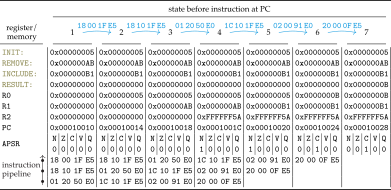
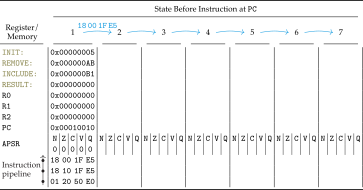
Fill in table 1.9 as was shown in section 1.6 using the program in table 1.10. Begin with the program counter (PC) at memory address 0x10010 and follow the corresponding instructions in table 1.10, annotating the registers and memory contents as appropriate.
| Memory Address | Memory Content | Instruction Mnemonic |
|---|---|---|
0x10000 |
05 00 00 00 |
INIT: .long 0X05 |
0x10004 |
AB 00 00 00 |
REMOVE: .long 0XAB |
0x10008 |
B1 00 00 00 |
INCLUDE: .long 0XB1 |
0x1000C |
00 00 00 00 |
RESULT: .long 0X00 |
0x10010 |
18 00 1f E5 |
LDR R0, INIT |
0x10014 |
18 10 1f E5 |
LDR R1, REMOVE |
0x10018 |
01 20 50 E0 |
SUBS R2, R0, R1 |
0x1001C |
1c 10 1f E5 |
LDR R1, INCLUDE |
0x10020 |
02 00 91 E0 |
ADDS R0, R1, R2 |
0x10024 |
20 00 0f E5 |
STR R0, RESULT |