2.5 The UI functions of the T1 library
In section 1.11, the UI functions of the T1 library were introduced. A more detailed view of the operational diagram from figure 1.13 is given in figure 2.2.
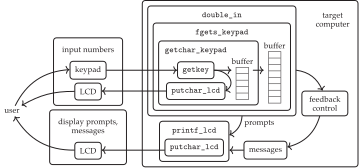
The functions fgets_keypad() and getchar_keypad() will be written in lab exercise 2. Their detailed operation is illustrated in figure 2.2, along with the rest of the UI functions. The getchar_keypad() function works like the standard library getchar(): it reads a char from an input stream (a stream is a Unix abstraction in which data elements are made available in sequence), usually from a user-input device like a keyboard. Our getchar_keypad() is a buffered getchar(), which means that it will be able to write to a char-array buffer, which keeps track of the entered characters and can be edited by a user.
The lowest-level C functions supporting double_in() are getkey(), which interprets digital inputs (DIs) as keystrokes and returns the corresponding key code char; and putchar_lcd(), which sends character codes to the LCD so that a user can see the updated number that they are entering. These will be written in lab exercise 3.